
Please review and follow these instructions in order to Register for a class:
- Press the “Continue to Register” button at the bottom of this web page to complete the Registration Form.
- On the Registration Form, fill out all fields. Then press the “Submit” button.
- The Registration Form will then tell you to use a provided “link below” to complete your payment…

- The Registration Form will calculate your total and show you the following “Payment Options”. Only choose the “Pay with PayPal” payment option (green arrow) as per the following image…

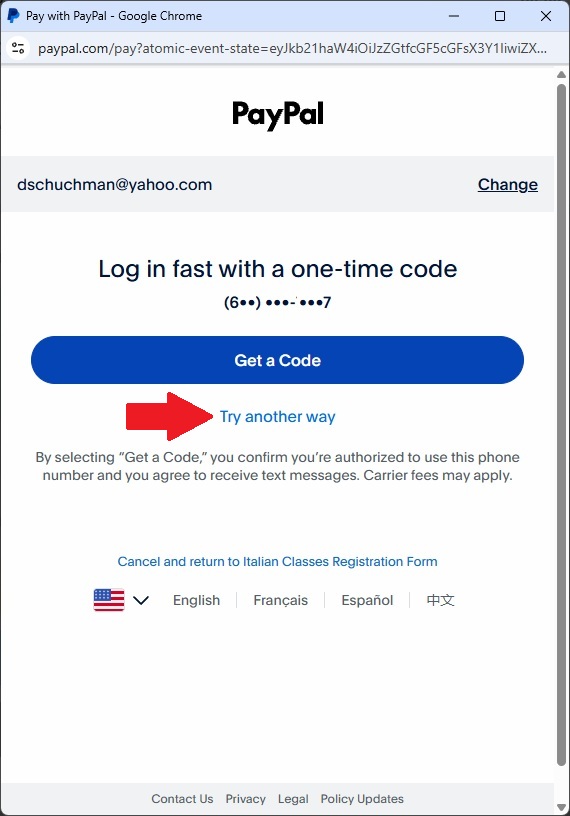
- The following PayPal “Log-in fast…” page will open. Only choose the “Try another way” link (red arrow) as per the following image. Do not press the “Get a Code” button unless you have a PayPal account….
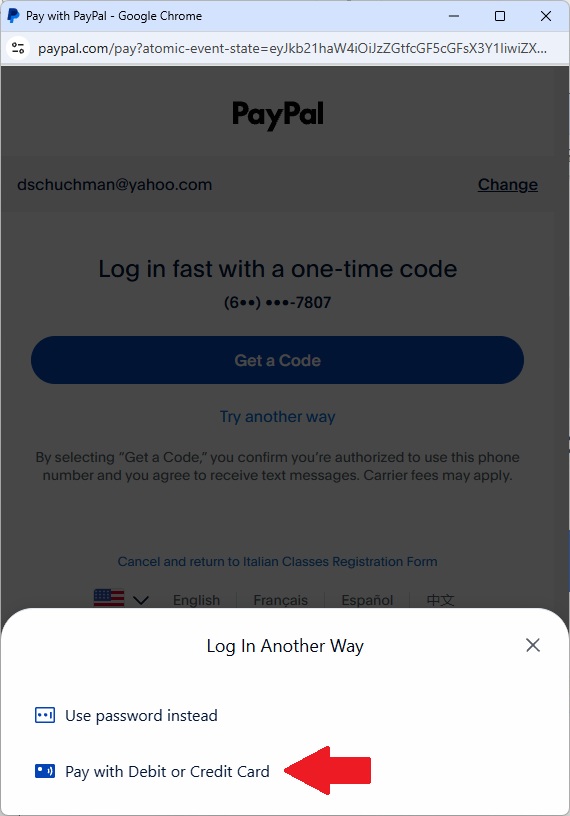
After that, select “Pay with Debit or Credit Card” (red arrow)
- Follow the on-screen payment instructions in PayPal to “Pay Now”.
When ready, press the following “Continue to Register” button…